Ask clients about their bank lines, and file the answers
Tick the transactions you don’t recognise, and A4O Accounts emails the client a question for each. They answer from a link on their phone, with no account. A4O chases them every week, and each answer files straight into the books. No spreadsheet of queries, and no chasing by hand.
How it works
1. Tick the lines
On an imported bank statement, press Ask the client and tick the lines you don’t recognise.
2. Check the questions
Each line gets a drafted question with answers the client can tap. Change the wording if you want to.
3. Send one email
The client gets every question in one email, with each line’s date, description and amount, and a link to answer.
4. File the answers
Answers come back to a queue. Pick the account and file, and the line is categorised in one step.
What your client sees
A link, not a login
The email comes from your name via A4O Accounts. The link opens a list of their questions with progress, then one question per screen.
Tap, type or attach
Each question has answers they can tap, such as “Stock or materials”, “Business trip” or “Personal — not for the business”. They can add a note or attach a receipt, and change an answer until you accept it.
Or just reply
If they reply to the email instead, the reply and its attachments are filed with their questions.
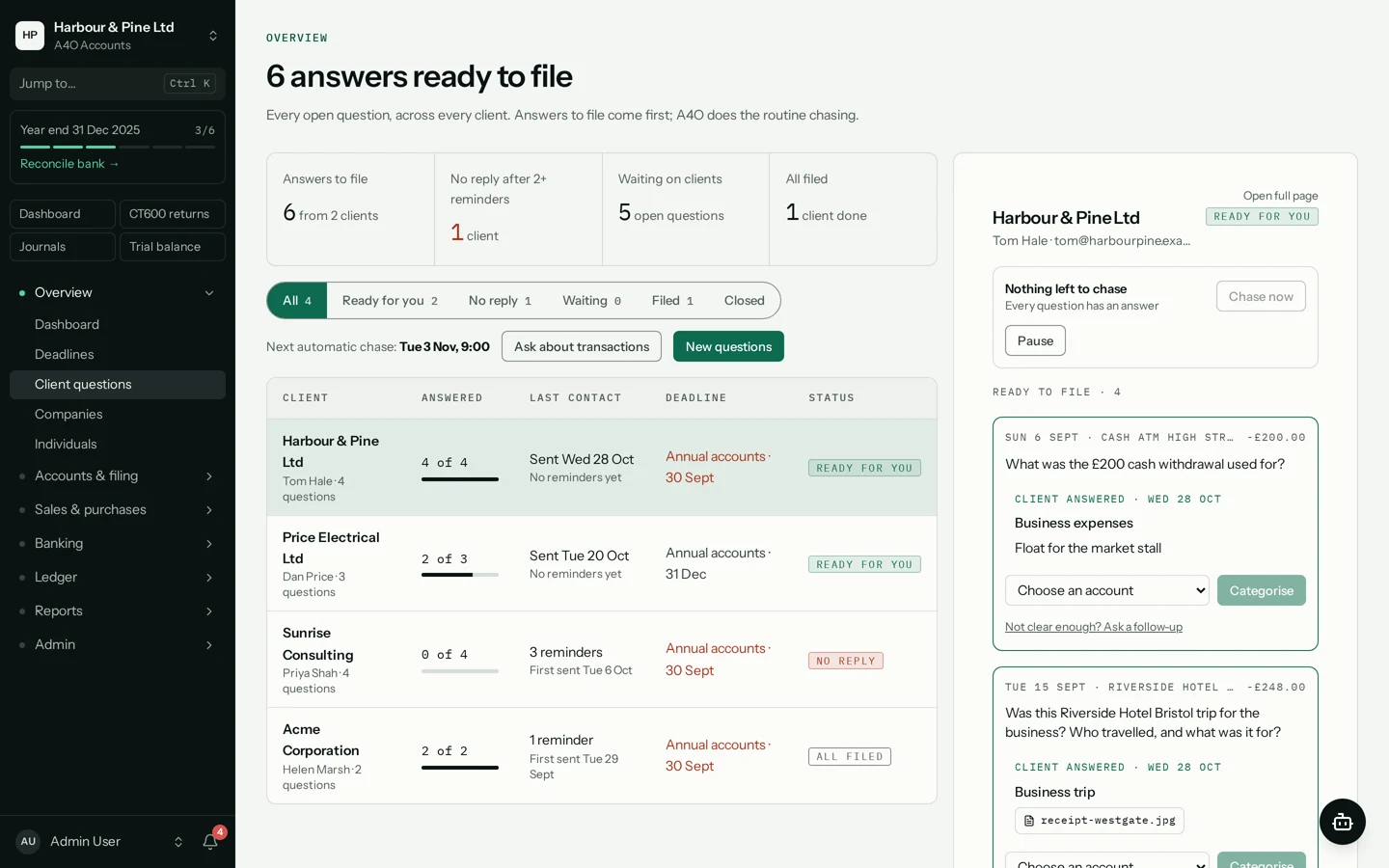
One queue across all your clients
Every request, for every client you can see, in one list, whichever company you have open.
What needs you comes first
Answers ready to file, then clients with no reply after two reminders, then those still waiting. Each row shows the client’s next filing deadline.
File in one step
Open a request, pick the account for each answer and file it. That sets the line’s account and accepts the answer.
Ask something else
Add another question to a request, even one that isn’t about a bank line. New questions go with the next email, or straight away if you chase now.
The chasing is done for you
Every Tuesday
Unanswered questions are chased by email on Tuesday mornings, once at least 5 days have passed since the last email, until they’re answered.
You stay in control
Pause chasing for a client, or chase now. You’re notified in the app when answers come in.
Security
The link is the key
Each request gets its own long random link. It works for 90 days from the last email that carried it, and stops taking answers when you close the request.
Your access rules still apply
Staff only see requests for clients they have access to, with the same roles as the rest of the app.
Not there yet
So you know before you rely on it.
Sending from your own domain
Emails come from A4O’s address, with your name on them: “<your name> via A4O Accounts”.
Outlook and Gmail
There’s no sync with your mailbox. Replies to the email are filed in A4O instead.
Assigning to staff
Requests aren’t assigned to a member of staff yet.
Remembering the client
You enter the client’s name and email each time you send.
Questions about Client questions
Does my client need an account?
No. The email has a link, and the link is all they need. They answer one question at a time on their phone or computer, with no sign-in.
What can the client send back?
A tapped answer, a note, or a file such as a receipt. Files can be PDFs or images, up to 5 MB each. They can change an answer until you’ve accepted it.
What if they reply to the email instead?
The reply is filed with their questions in A4O, with any attachments, as long as it comes from the client the questions went to. You then accept or categorise the line from the panel.
How often are clients chased?
Every Tuesday morning, if at least 5 days have passed since the last email, until every question is answered. You can pause chasing for a client, or chase now.
How long does the link work?
For 90 days from the last email that carried it. Each reminder carries the same link, and closing a request stops it taking answers.
Can I ask something that isn’t about a bank line?
Yes. From a request you can ask the client something else.
Does it work for sole traders?
Yes. It works for individual clients as well as companies, and the queue covers both.
How do I turn it on?
It’s turned on for each client company. A Manager of the company turns it on under Overview → Modules (see the help page on turning on modules). If you’d like a hand, email us.
More for practices
Try it with one client.
Turn it on for a client company under Overview → Modules, then tick the lines you want to ask about.
Need a hand? Email us.